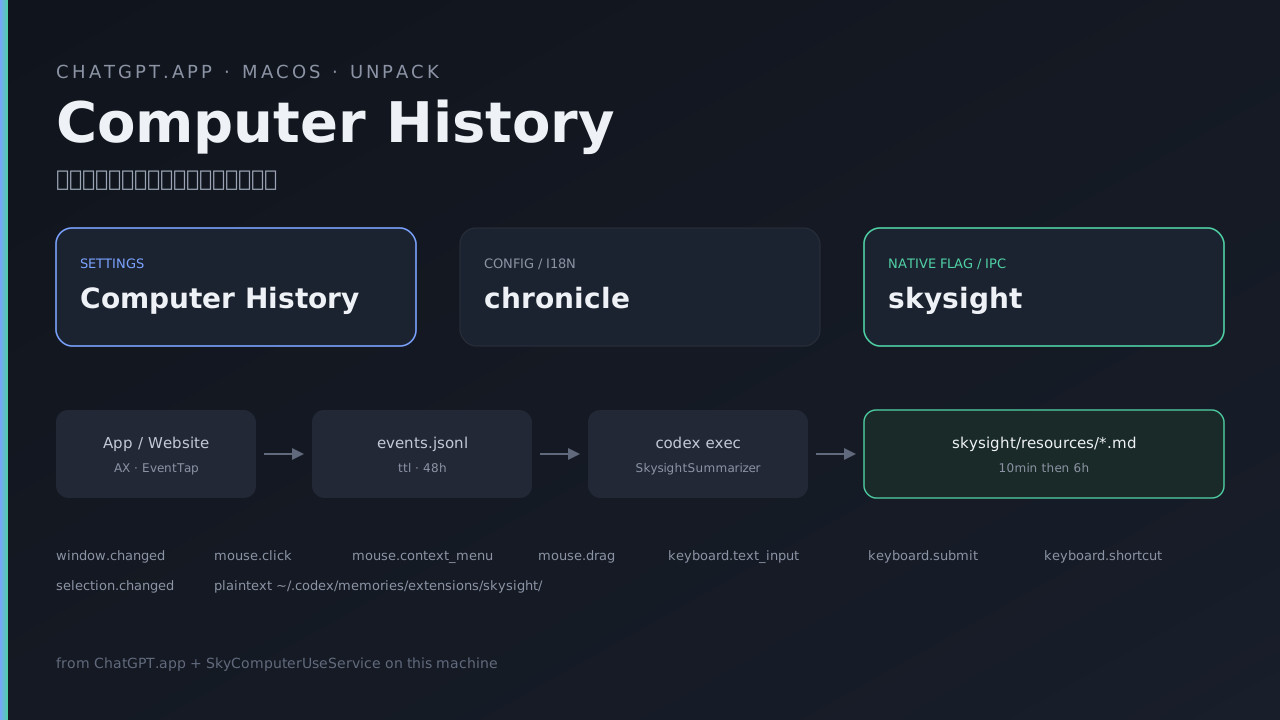
Computer History:从采集事件到 Markdown 记忆
记录日期:2026-08-19
这篇检查 macOS ChatGPT 桌面包中的 Computer History。先区分它与聊天历史、OwlHistory 和旧 Chronicle,再沿开关、原生采集、摘要生成和时间线读取往下看。
材料来自未加密的 app.asar 和原生 SkyComputerUseService。Electron 没有 source map,Service 也没有 Swift 源文件,因此压缩 JS、类型布局和字符串提供的证据强度不同。下面保留字段与路径供查阅,不把它们称为完整运行实现。
本机尚未让新采集器生成真实 events.jsonl。这限制了本文能验证的内容:安装包中的接口和提示词可以检查,实际采样、过滤和清理行为仍缺运行样本。
先看功能与数据去向
按安装包中的接口和摘要提示词,Computer History 将允许范围内的交互事件整理为 Markdown 记忆和时间线,供后续会话查询。产品名称、配置中的 chronicle 与原生层的 skysight 指向同一组相关功能。下文说明这些部件怎样连接,不代表本机已经实际采集。
1. 不要和这些搞混
| 名字 | 是什么 | 路径 / 标识 |
|---|---|---|
| Computer History | 本文对象。被动记交互事件 → 记忆 + 时间线 | features.skysight + features.chronicle;记忆在 ~/.codex/memories/extensions/skysight/resources/ |
| 旧 Chronicle | 2026-04 研究预览,录屏 + OCR | $TMPDIR/chronicle/screen_recording/;二进制 codex_chronicle;旧记忆在 ~/.codex/memories_extensions/chronicle/ |
| Computer Use | Agent 主动点、打、控 App | 同一套 Sky 客户端,子命令 mcp |
| Record & Replay | 你按开始/结束,演示一遍做成 skill | 同一客户端,子命令 event-stream mcp |
| 会话 / thread history | 聊天记录 | ~/.codex/sessions、thread_history_1.sqlite |
| OwlHistory | 内置浏览器网页历史 | owl-feature-bootstrap-cache.json 里的 OwlHistory |
Computer History 打开时会把旧 Chronicle skill 归档,采集改走 Skysight。旧 Chronicle 的 242 条 md 不会被新时间线读取。
2. 三个名字对照
同一功能在包里同时存在:
| 层 | 名字 |
|---|---|
| 用户可见 | Computer History |
| 设置页 i18n / React query / 配置开关 | chronicle(settings.chronicle.*、t.chronicle.listHistory()、features.chronicle) |
| 桌面 feature flag | skysight(默认 false,仅 darwin) |
| 原生 IPC / 分析 | ComputerUseIPCSkysight、CodexSkysight |
| 插件包 | computer-history |
| 记忆目录 | memories/extensions/skysight/ |
asar 里实例化条件(主进程):
chronicle: process.platform === "darwin"
  && this.options.getSkysightRecorderController != null
    ? new /* ChronicleHostService */(..., {
        list: () => pde({ resourcesDirectory: u }),
        listSuggestions: () => mde({ resourcesDirectory: u }),
        listSummaryIntervals: (sinceMs) => hde({ resourcesDirectory: u, sinceMs }),
      })
    : undefined
u 固定为:
path.join(executionCodexHome, "memories", "extensions", "skysight", "resources")插件表:
{
  ...computerHistory,
  isAvailable: ({ features, platform }) =>
    platform === "darwin" && features.skysight
}
3. 本机对应的安装物
记录时版本:
| 组件 | 值 |
|---|---|
/Applications/ChatGPT.app | bundle com.openai.codex,26.814.41407 (build 6720) |
| Computer Use / Sky | com.openai.sky.CUAService,26.817.1000761 |
| Computer History 插件 | 1.0.1000761(与 Computer Use、Record & Replay 同号) |
| Codex CLI 缓存版本 | 0.148.0(~/.codex/version.json) |
| 官方上线 | 2026-08-13(What's new:August 10–14, 2026) |
关键文件:
/Applications/ChatGPT.app/Contents/Resources/app.asar
/Applications/ChatGPT.app/Contents/Resources/plugins/openai-bundled/plugins/computer-history/
/Applications/ChatGPT.app/Contents/Resources/codex_chronicle          # 旧 sidecar,仍打包
/Applications/ChatGPT.app/Contents/Resources/computer-history.svg
/Applications/ChatGPT.app/Contents/Resources/computer-history-pause.svg
/Applications/ChatGPT.app/Contents/Resources/computer-history-resume.svg

~/.codex/computer-use/Codex Computer Use.app/
  Contents/MacOS/SkyComputerUseService
  Contents/SharedSupport/SkyComputerUseClient.app/Contents/MacOS/SkyComputerUseClient
  Contents/Resources/Package_ComputerUse.bundle/Contents/Resources/
    SkysightSummarizer.md
    SkysightMemoryInstructions.md
asar 内与 Computer History 直接对应的前端 chunk:
webview/assets/chronicle-settings-page-*.js      # 设置 + 时间线 UI
webview/assets/computer-history-query-*.js       # listHistory / suggestions / intervals
webview/assets/computer-history-suggestions-*.js
webview/assets/computer-history-suggestion-prompt-*.js
.vite/build/main-*.js                            # 主进程 recorder + 时间线解析
.vite/build/src-*.js                             # App Server 侧 coordinator
没有 .map。源码是压缩 JS,不是原始 TypeScript。
4. 谁能开、什么条件
这里把公开说明与本机代码中的启用条件并列。开关写为 true、权限齐备和服务实际运行,需要分别检查:
- 平台:macOS。代码里 sidecar/Skysight 额外要求
darwin && arm64(或NODE_ENV===test)。Intel Mac 走不通这条。 - 套餐:Pro / Business / Enterprise。API key、Amazon Bedrock 不可用。
- 地区:EEA、瑞士、英国没有(官方文档)。
- 双开关:用户配置必须同时
features.memories === truefeatures.chronicle === true
配置路径由 Yb(name) 写成 features.<name>,经 config/value/write upsert。
- 桌面 flag:
features.skysight === true(客户端默认 false,由服务端 / Statsig 打开)。 - 组织门闩:
configRequirements.featureRequirements.chronicle !== false。为 false 时抛
Computer History is disabled by your organization。
- 权限:macOS Accessibility。不要 Screen Recording。没批完时:
enabled: true,recorderState: "stopped",activationState: "waiting_for_permissions"。
- Business / Enterprise:管理员先开 Enable Computer History,成员再自己开。管理员批准 ≠ 替用户打开。
isFeatureConfigured():
orgAllowed
  && userConfig.features.memories === true
  && userConfig.features.chronicle === true
5. 架构
允许的 App / 网站
        │  macOS Accessibility(点击、按键、切窗、AX 文本/diff、选中、焦点、鼠标/键盘目标)
        ▼
SkyComputerUseService  (原生,写事件段)
        │  Apple Events IPC(ComputerUseIPCSkysight*)
        ▼
SkyComputerUseClient
        │  Electron worker 方法 skysightStart/Stop/Pause/Resume/Status/GetSettings/UpdateSettings/ClearHistory
        ▼
ChatGPT.app 主进程 recorder
        │  状态机 + 插件安装 + 旧 skill 归档
        ▼
本地事件流(App Group,官方称 ≤48h)
  <eventStreamRootPath>/segments/<ts>/
    events.jsonl
    metadata.json
  另有 suppressedEventsPath(被策略丢掉的事件)
        │  周期性 ephemeral Codex session
        │  提示词:SkysightSummarizer.md
        ▼
~/.codex/memories/extensions/skysight/resources/
    <utc>-<4字母>-10min-memory-summary.md
    <utc>-<4字母>-6h-memory-summary.md
        │  phase2:SkysightMemoryInstructions.md
        ▼
~/.codex/memories/MEMORY.md 等长期记忆(打 [skysight memory])
        │  以后某次对话用到
        ▼
记忆正文进入请求上下文(是否训练看 ChatGPT data controls)
同一原生二进制 SkyComputerUseClient 的子命令:
| 子命令 | 产品 |
|---|---|
mcp | Computer Use |
event-stream mcp | Record & Replay |
computer-history mcp | Computer History |
turn-ended | Codex 一轮结束通知(config.toml 的 notify) |
插件启动:
computer-use-client-launcher computer-history mcp
→ $CODEX_HOME/computer-use/Codex Computer Use.app/.../SkyComputerUseClient computer-history mcp
6. 打开 / 暂停 / 关闭(主进程源码)
Recorder 类(asar main-*.js,压缩名 Dre)。
默认缓存状态:
{
  state: "stopped",
  eventStreamRootPath: null,
  currentSegmentEventsPath: null,
  currentSegmentMetadataPath: null,
  suppressedEventsPath: null,
  startedAtMs: null,
  endedAtMs: null,
}
原生时间戳是 Apple 纪元(2001-01-01)。Electron 换算:
APPLE_EPOCH = 978307200
startedAtMs = (startedAt + 978307200) * 1000状态:stopped | running | paused。
激活态:idle | starting | waiting_for_permissions | failed。
打开 enable()
desiredState = running,串行执行,失败则停采集并回滚:
archiveLegacyChronicleSkill()
见第 14 节。reason = skysight_gate_enabled。
reconcileComputerHistoryPluginInstallation(true)
对齐 bundled 插件 computer-history。
- worker:
skysightStart
原生超时 115 秒(start/resume);其它操作 15 秒。
Apple Event 失败码 -600 / -609 / -1708 / -1717 会退避重试。
服务端回 Computer History is not enabled for this user 也会重试。
权限 pending:配置已写成开启,采集仍 stopped。
权限 denied:回滚配置,enabled: false。
对齐 reconcileEnabled()
已开过、服务重启后:若 status 已是 running 则只同步 desiredState,否则再 skysightStart。
暂停 / 继续
skysightPause,可选{ duration }。不带 duration 时desiredState = paused;带 duration 时仍视为running(限时暂停)。- 原生枚举
SkysightPauseDuration/ protobuf 字段:thirtyMinutes、oneHour、untilTomorrow。MCP 文案:Temporarily pause Computer History without disabling it. skysightResume:若已 stopped 则改skysightStart;已 running 则原样返回。
关闭 disable()
skysightStop。停完后若 currentSegmentEventsPath 或 currentSegmentMetadataPath 仍非空,抛:
Chronicle stopped but did not close its current segment
然后 reconcileComputerHistoryPluginInstallation(false)。
双后端
getSkysightRecorderController() 有值 → 新 Skysight。
没有 → 旧 sidecar:$TMPDIR/codex_chronicle/chronicle-started.pid,环境变量 CODEX_CHRONICLE_STARTED_PID_PATH,配置对象 codex_chronicle_config。包里仍带 codex_chronicle 二进制。
7. 原生 IPC
Electron → SkyComputerUseClient → SkyComputerUseService,Apple Events。
Electron worker 方法
| 方法 | 作用 |
|---|---|
skysightStart | 开始采集 |
skysightStop | 停止并关闭当前 segment |
skysightPause | 暂停,可选 duration |
skysightResume | 继续 |
skysightStatus | 状态 + 路径 |
skysightGetSettings | 观察策略 |
skysightUpdateSettings | 整份覆盖 settings |
skysightClearHistory | { scope, interval? } |
Swift / protobuf 类型(Client 二进制字符串)
ComputerUseIPCSkysightStartRequest
ComputerUseIPCSkysightStopRequest
ComputerUseIPCSkysightPauseRequest
ComputerUseIPCSkysightResumeRequest
ComputerUseIPCSkysightStatusRequest
ComputerUseIPCSkysightStatus
ComputerUseIPCSkysightState
ComputerUseIPCSkysightGetSettingsRequest
ComputerUseIPCSkysightUpdateSettingsRequest
ComputerUseIPCSkysightUpdateObservationPolicyRequest
ComputerUseIPCSkysightSettings
ComputerUseIPCSkysightObservationSettings
ComputerUseIPCSkysightObservationRule
ComputerUseIPCSkysightObservationRuleScope
ComputerUseIPCSkysightObservationDefaultBehavior
ComputerUseIPCSkysightClearHistoryRequest
ComputerUseIPCSkysightClearHistoryScope
ComputerUseIPCSkysightHistoryInterval
菜单栏另有 ComputerUseIPCCodexStatusItemMenuStateRequest、ComputerUseIPCAppStopRequest。
分析事件
CodexSkysightServiceStarted / Stopped / Paused / Resumed
CodexSkysightServiceStopReason
CodexSkysightObservationSettingsUpdated
CodexSkysightHistoryCleared
CodexSkysightMemorySummaryFinished
CodexSkysightMcpServerLaunched
CodexSkysightMcpToolCalled
CodexSkysightStatusItemActionClicked
传输:Apple Events + XPC。Client 字符串里有 CodexComputerUseIPC-3、CodexComputerUseNativeBridge-1、ComputerUseIPCXPCTransport、sendRequestWithTypeName:requestData:...。版本不一致会要求用户重启 ChatGPT.app。
events.jsonl 不在 Client 里。写入器在 Service:EventStreamJSONLWriter、SkysightSegmentWriter。路径经 Status 回传。
ComputerHistoryMCPServer 中定位到的工具说明:
| 工具 | 文案 |
|---|---|
computer_history_pause | Temporarily pause Computer History without disabling it. |
computer_history_resume | Resume a paused Computer History recorder. |
computer_history_status | Get Computer History status and paths to recent activity files. |
computer_history_get_settings | Get all Computer History settings. Call this immediately before updating settings so unchanged fields can be preserved. |
computer_history_update_settings | Replace all Computer History settings. … first calling computer_history_get_settings. |
Status 回传字段(Client 类型布局):state、eventStreamRootPath、currentSegmentEventsPath、currentSegmentMetadataPath、suppressedEventsPath、startedAt、endedAt。
另有 sessionDirectoryPath、maxDurationSeconds(Record & Replay 共用事件层)。
工具 JSON schema 没有以明文 JSON 躺在二进制里(additionalProperties 紧挨着 update 文案)。参数形状以 Electron Zod + protobuf 字段名为准。
8. 观察策略(settings)
Zod 形状(asar 里校验):
{
  observation: {
    defaultApplicationBehavior: "observe" | "do_not_observe",
    defaultURLBehavior: "observe" | "do_not_observe",
    allowlist: Array<{ scope: "app" | "url", bundleID?: string | null, urlDomain?: string | null }>,
    blocklist: Array<{ scope: "app" | "url", bundleID?: string | null, urlDomain?: string | null }>,
  }
}
规则(插件 SKILL.md):
- App 规则:
scope: "app"+bundleID - 网站规则:
scope: "url"+urlDomain(含子域) - allow / block 可并存;同 scope 里 block 永远赢
- 浏览器记录必须 App 策略 和 URL 策略都放行;没有 URL 的记录只看 App
- 隐私浏览永远排除
update_settings是整份覆盖;改之前必须先get_settings
UI 四套:Exclude these apps / websites,Include only these apps / websites。
时间线条目上点 App 图标,可以直接 exclude / include。
菜单栏策略补丁走 ComputerUseIPCSkysightUpdateObservationPolicyRequest,映射:
app.include  → include_application
app.exclude  → exclude_application
url.include  → include_url
url.exclude  → exclude_url
清除映射:
application_session → clear_application_session
last_ten_minutes    → clear_last_ten_minutes
last_hour           → clear_last_hour
last_day            → clear_last_day
菜单状态还带:
{
  computerUse: { activeApplications: App[] },
  computerHistory: {
    state: "stopped" | "running" | "paused",
    canClearHistory: { lastTenMinutes, lastHour, lastDay },
    recentApplications: Array<App & {
      isExcluded,
      lastSession: { startedAt, endedAt, canClearHistory },
      domains: Array<{ domain, isExcluded }>,
    }>,
  }
}
9. 事件流(采集产物)
Service 内嵌提示词与 SKILL 一致,并标明 ephemeral:
# Raw event stream segments (ephemeral; not persisted)
<eventStreamRootPath>/
  segments/
    <segment_timestamp>/
      events.jsonl      # append-only activity events
      metadata.json     # timestamps and event counts
      suppressed.jsonl  # 被策略丢掉的事件(Service 文件名)
eventStreamRootURL 在 SkysightService 上。Status 另回 suppressedEventsPath。
metadata.json 字段:startedAt、endedAt、endReason、eventCount、suppressedEventCount。
Record & Replay 同一套存储还会写 session.json(endReason 如 recording_controls_cancelled)。Computer History 用滚动 segment。
路径相关字段:rootDirectoryURL、directoryURL、eventsURL、metadataURL、suppressedEventsURL、memoryResourcesURL、memoryExtensionURL、configurationRootURL。
容器:appGroupContainerUnavailable(官方 App Group;本机 Group Container 2DC432GLL2.com.openai.sky.CUAService 目前只有 IPC socket computeruse.sock,没有 segment 目录——功能没开过)。
TTL 与删除相关字段:
- 存储对象带
ttl、expiresAt、expirationTime、retainUntil。 EventStreamStorageConfiguration/EventStreamStorageError/missingEventsFile。- 产品文档写事件最多 48 小时;Electron 时间线建议窗口也是
2880 60 1000ms = 48 小时。两边用同一量级。 - 没有在二进制里看到字面量
"48 hours";删除走 TTL 字段,不是 cron 文案。 segmentDurationSeconds表示滚动段时长。实际值在运行时配置中,本次没有从事件记录确认;tenMinuteSummaryTasks这个名称不能单独确定每段的长度。- 调度:
tenMinuteSummaryTasks、sixHourRollupTasks。
产品说明不采集录屏和音频。包内另有 privateBrowsingExcluded、PrivateBrowsingIndicators 及本地化隐私浏览标题,用于相关排除判断;本次没有运行各浏览器逐项验证过滤效果。
9.1 一条事件(EventStreamRecord)
__swift5_reflstr 里,记录字段和枚举 case 紧挨着,这就是 Codable 用的名字。
记录字段:
timestamp
kind
app
window
mouse
keyboard
selection
ax
旁边还有一条 AX 通知记录:timestamp、kind、app、window、notificationKind、selection、windowID、text、eventTarget、ax(_pendingAXNotificationRecords)。
顶层 / 嵌套字段(同一段反射字符串):
bundleIdentifier, url, windowID, clickCount, text, selectedText
eventsPath, eventCount, suppressedEventCount
directoryURL, eventsURL, metadataURL, suppressedEventsURL
Swift 构造器还带 diagnostic: EventStreamDiagnostic?。没有 typedText 这个键;键盘输入走 keyboard + kind keyboardTextInput,缓冲在 _textBuffer / _textFlushTask。
9.2 定位到的 EventStreamEventKind 枚举
window.changed mouse.click mouse.context_menu mouse.drag keyboard.text_input keyboard.submit keyboard.shortcut selection.changed
反射字符串里 8 个 case,与 JSON raw value 一一对应:
| Swift case | JSON kind |
|---|---|
appWindowChanged | window.changed |
mouseClick | mouse.click |
mouseContextMenu | mouse.context_menu |
mouseDrag | mouse.drag |
keyboardTextInput | keyboard.text_input |
keyboardSubmit | keyboard.submit |
keyboardShortcut | keyboard.shortcut |
selectionChanged | selection.changed |
二进制里另外还有 terminal.value_changed、session.started、session.ended。后两个更像 Record & Replay 的 session.json 边界,不一定是 Computer History 的 EventKind。terminal.value_changed 对着终端 bundle 表,可能是终端专用分类,不在这 8 个 case 里。
底层 AX 通知(先变成 pending,再 debounce 成上面的 kind):
AXApplicationActivated / Deactivated / Shown / Hidden,AXFocusedUIElementChanged,AXFocusedWindowChanged,AXMainWindowChanged,AXSelectedTextChanged,AXSelectedChildrenChanged,AXWindowMiniaturized / Deminiaturized,AXUIElementDestroyed,AXMenuItemSelected。
AX 树:EventStreamAXTree + Mode;isAXTreeDiffingEnabled、feature axTreeDiffing。diff 语法:~ / + / -。残留路径:ComputerUse/RefetchableSkyshotAXTree.swift。
9.2.1 采集循环相关的 Service 字段
EventStreamRecorder 内部状态(reflstr):
_eventTap
_currentAppPID
_frontmostAppObserver
_axObserver
_previousWindowRevision
_previousWindowRevisionWindowID
_latestURLByWindowID
_mouseDown
_textBuffer
_textFlushTask
_pendingAXNotificationRecords
_axNotificationDebounceTasks
onSuppressedRecord / _onSuppressedRecordStored
_shouldCaptureApplication
对应 CG 层:clickEventTap、keyboardEventTap、mouseEventTaps、mouseDown / mouseUp / mouseDragged / mouseMoved。
流程:
- EventTap 收鼠标/键盘;AXObserver 收焦点、选区、窗口。
- 鼠标按下记在
_mouseDown,松手合成mouseClick/mouseDrag/mouseContextMenu。 - 按键进
_textBuffer,debounce flush 成keyboardTextInput;回车/快捷键单独成keyboardSubmit/keyboardShortcut。 - AX 通知进
_pendingAXNotificationRecords,debounce 后合成appWindowChanged/selectionChanged。 _latestURLByWindowID给浏览器记录补 URL。EventStreamRecordFilter+EventStreamURLPolicyRecordFilter:过不了就appendSuppressed→suppressed.jsonl。- 通过则
EventStreamJSONLWriterappend → 当前 segment 的events.jsonl。
抑制原因(reflstr,对应 SkysightObservationSuppressionReason):
applicationExcluded
privateBrowsingExcluded
urlExcluded
urlPolicyBlocked另有错误态:appNotAllowed、recorderSuppressed、appGroupContainerUnavailable。
9.3 硬编码特殊 bundle(Service 连续字符串表)
以下密码管理器 bundle 出现在相邻字符串区域。它们提示存在相关处理,默认是否全部抑制还不能只凭列表确认:
com.1password.1password
com.1password.safari
com.bitwarden.desktop
com.dashlane.dashlanephonefinal
com.lastpass.LastPass
com.nordsec.nordpass
me.proton.pass.electron
me.proton.pass.catalyst
终端(对应 terminal.value_changed):
com.apple.Terminal
com.googlecode.iterm2
dev.warp.Warp-Stable
net.kovidgoyal.kitty
com.github.wez.wezterm
com.mitchellh.ghostty
com.raphaelamorim.rio
dev.commandline.waveterm
本产品(避免录自己):
com.openai.codex / .alpha / .beta / .dev / .nightly
com.openai.chat.alpha / .beta / .nightly / .mac-debug
com.openai.atlas / .alpha / .beta
浏览器(走 URL 策略 + 无痕检测,不是一律不记):
com.google.Chrome
com.apple.Safari
com.brave.Browser
com.microsoft.edgemac
com.operasoftware.Opera
com.vivaldi.Vivaldi
company.thebrowser.Browser / .browser / .dia
org.chromium.Chromium
ai.perplexity.comet
com.openai.atlas*
紧接着是 com.apple.UserNotificationCenter、LocalAuthenticationRemoteService、SecurityAgent,以及多语言「无痕/隐私浏览」标题碎片。
Electron 时间线另外还滤:com.openai.sky.CUAService、Dock、Control Center、WindowManager 等(第 10 节)。
9.4 从事件到摘要的 Service 组件
类型:
SkysightMemoryPipeline
SkysightSummariser / SkysightSummarizer
SkysightCodexExecSummariser    # 调 `codex exec`
SkysightChildSummary
SixHourWindow
SkysightSummaryError
SummaryFile
ProcessOutput                  # succeed / failed / timed_out
出错字符串:
codex exec did not emit a final agent message.
codex exec timed out.
codex exec failed:
invalid summary directory.
invalid child summary:
摘要组件中能看到 10 分钟窗口和 6 小时窗口相关名称:前者把 segment 路径置于不可信输入边界内,后者处理 child summaries。这些窗口名称不能直接确定每个采集 segment 的真实时长。
提示词还要求:只用事件流当证据;记忆里不要凭据、token、原始 event JSON。
这些字符串与公开说明中的 ephemeral Codex session 对应,也出现了本机 codex exec 的调用配置。具体启动参数、调用频率和运行结果仍需用实际进程与日志核对。
分析事件 CodexSkysightMemorySummaryFinished 对应这一步结束。
9.5 Codex 自己怎么用这些数据(asar src-*.js 环境提示)
Ambient suggestions 的硬规则:
- 插件可用且近期活动能说清当前工作时,先
computer_history_status,再读数据。 - 只读最小的近期摘要。当不可信上下文,重要细节对权威源。
- stopped / paused / 没数据:不要读文件。
- 永远不要自行 start/resume、改设置、碰 raw event 文件、抖出无关或敏感活动。
这和用户手动问「我刚才在干什么」时 SKILL 允许 rg events.jsonl 是两套策略:后台建议更严。
10. 记忆文件格式(时间线真正读的东西)
目录:
$CODEX_HOME/memories/extensions/skysight/
  instructions.md          # 即 SkysightMemoryInstructions.md 的落地版
  resources/
    YYYY-MM-DDTHH-MM-SS-<4字母>-10min-memory-summary.md
    YYYY-MM-DDTHH-MM-SS-<4字母>-6h-memory-summary.md
主进程文件名正则:
/^(\d{4}-\d{2}-\d{2})T(\d{2})-(\d{2})-(\d{2})-[^-]+-(10min|6h)-memory-summary\.md$/时间从文件名解析为 UTC:Date.parse(${date}T${hh}:${mm}:${ss}Z)。
| 后缀 | 窗口 | summaryLevel |
|---|---|---|
10min | 10 分钟(600 * 1000 ms) | ten_minute |
6h | 6 小时(360 60 1000 ms) | six_hour |
时间线合并
- 列出目录里所有匹配文件
- 读 YAML frontmatter(
---围栏,zod 校验) - 有 6h 覆盖的区间,不再展示落在该区间内的 10min
- 按
startMs降序 suggestion仅当now - startMs < 48h(2880 60 1000)才带上
Frontmatter schema:
---
title: string
description: string          # 给用户看,用 you/your
applications: [bundle.id]    # 只要 bundle id
suggestion:                  # 可选;解析失败则丢掉,不整条作废
  type: skill | automation
  name: string
  description: string
---
不进 App 图标列表的 bundle
com.openai.sky.CUAService
com.apple.WindowManager
com.apple.controlcenter
com.apple.dock
com.apple.notificationcenterui
com.apple.UserNotificationCenter
com.apple.LocalAuthentication.UIAgent
com.apple.LocalAuthenticationRemoteService
com.apple.SecurityAgent另:isBackgroundAgent === true 的也会滤掉。
摘要正文结构(SkysightSummarizer.md)
三个一级标题,顺序固定:
- Memory summary
- Relevant prior context(只写本窗口之前;优先读更早的 skysight resources)
- Important non-obvious context about the user
- Recording summary(按时间段细账)
- Citations(只许本地路径 / 本地产物,禁止 URL 和 markdown 链接)
摘要提示词要求把事件、AX 文本、网页和子摘要作为不可信输入,并排除凭据、PII 等内容。提示词中的禁止规则不是过滤效果的实测证明;要验证它,需要带有相应测试样本的运行记录。
phase2 合并(SkysightMemoryInstructions.md):
- frontmatter 当展示元数据,合并时忽略
- 只把反复出现的习惯送进 User Profile
- 时间线细节只在对后续任务有用时进
MEMORY.md - 来源打标签
[skysight memory]
11. 设置页 UI(asar chronicle-settings-page)
路由在 Settings → Integrations → Computer history。i18n 前缀仍是 settings.chronicle.*。
未打开
卖点文案:不录屏、不录音;可问刚才在做什么、少解释、发现可自动化的重复劳动。
示例问答(产品写死的演示,不是真实记忆):
- What did I promise to send Sarah after yesterday’s meeting?
- What was I working on before lunch?
- What was that planning document I was looking at today?
- Where was I on the home remodel?
前置检查:服务是否在、Memories 是否可用。没有 Memories 会弹出「先开 Memories」。
同意框
- 可随时暂停、清除、管 App
- 建议排除健康 / 财务类
- 视频会议、即时通讯:除非对方明确同意,否则要暂停
按钮:Allow all apps / Customize apps。
已打开
- 开关、Pause / Resume、Turn off
- Permissions:四套包含/排除
- History:按今天 / 昨天,早 / 午 / 晚 / 夜
- 单条:Reveal in Finder、删除、Exclude/Include 该 App、Ask about your history
- Suggested skill / automation → 开新对话(见下)
- 批量清:10 分钟 / 1 小时 / 1 天 / 全部(不可恢复)
「问历史」预填 prompt(产品写死)
Give me a list of tasks I’ve worked on today and their status
Prepare a summary of what I did yesterday for standup
Where can I find the proposal document I was looking for earlier today?
Who contacted me today that I need to follow up with?
Roast my computer behavior
How often do I get distracted, and what usually pulls me off task?
Give me feedback on how I operate day to day
Analyse the writing samples you have from me and describe my writing style with examples and guidelines
Create a reusable skill that writes like me
What keyboard shortcuts do I use most? And which should I be using more?
Where am I being ineffective, and what should I be using AI for instead?
What is my most commonly used phrase?
How do I split my time between focused work, switching tabs, and returning to unfinished tasks?
What was I working on before my last break?
Suggestion → 新对话
skill:
Create a new "{name}" skill based on the description below.
Consult the memory at {memoryFilePath} and the events.jsonl files cited there
to understand the recorded workflow and my actions.

"{request}"
automation 额外一句:Use my local timezone and a new chat for scheduled runs.
未读 skill 建议会堆在 atom 里;打开相关 UI 后清掉。建议去重:同 type + 小写 trim 后的 name + 时间区间相交。
Query key:["chronicle-history"],suggestions / summary-intervals 是它的派生。staleTime: 0,聚焦窗口会重拉。
summary-intervals 默认回看 10080 60 1000 ms = 7 天。
另有 Statsig / 实验 id 3488289778:不满足则前端不把 Computer History suggestions 当可用。
12. 插件 / MCP / Agent 用法
插件 computer-history 1.0.1000761,Proprietary,category Productivity。
MCP 工具(SKILL + ComputerHistoryMCPServer 二进制文案):
| 工具 | 作用 |
|---|---|
computer_history_status | 状态 + 近期活动文件路径 |
computer_history_pause | 暂停但不关闭功能;原生 duration:thirtyMinutes / oneHour / untilTomorrow |
computer_history_resume | 继续 |
computer_history_get_settings | 读完整策略 |
computer_history_update_settings | 整份覆盖;非法设置报 Invalid Computer History settings: |
SKILL 要求:
- 先
computer_history_status,再用date对时间 - 问大范围先读 6h,再下钻 10min
- 问刚发生的事:
rgevents.jsonl(App、窗口、URL、选中、输入、焦点、目标、AX) - 认到源之后立刻切 connector / 文件系统 / App skill,不要靠事件残缺文本干活
- 不要用 Record & Replay 的工具回答「我刚才在干什么」
- 不要手改磁盘上的 settings,只用 MCP
默认快捷 prompt:
- Pause Computer History while I work on something private
- What was I doing recently?
- Exclude Slack from Computer History
13. 和 Codex Memories 的关系
Computer History 依赖 Memories,单独开不了。
| ChatGPT 网页 Memory | 本地 Codex Memories | Computer History | |
|---|---|---|---|
| 来源 | 聊天里模型决定记住的 | 空闲会话摘要 + 合并 | 电脑上的真实操作 |
| 存储 | 云端 | ~/.codex/memories/ | 事件 → skysight md → 可选并入本地 Memories |
| 控制 | Personalization | /memories、[features] memories | Settings > Computer history + 菜单栏 |
| 粒度 | 长期偏好 | 会话 / 项目 | 10min / 6h 时间线 |
本地 Memories 自己还会:跳过进行中/太短的会话;额度低了不抽;memories.disable_on_external_context 可排除用过 MCP / web search 的会话。
摘要流程包含模型调用,可能消耗 Codex 用量。本机未运行这一功能,本文没有测量后台调用频率或额度开销。
14. 从 Chronicle 迁到 Computer History
产品说法:replaces Chronicle, rebuilt system rather than a rename。
打开 Computer History 时归档旧 skill(主进程 ire()):
| 源 | 去向 |
|---|---|
~/.codex/skills/chronicle | ~/.codex/skysight/migration/legacy-chronicle-skill/<ts-uuid>/skill |
~/.codex/.codex-chronicle-assets-to-install.marker | 同目录 marker |
| 元数据 | 同目录 metadata.json(originalPath、hash、reason=skysight_gate_enabled、时间) |
跨卷用 copy + rm。归档成功会 broadcastQueryCacheInvalidation(["skills"])。
旧记忆目录 ~/.codex/memories_extensions/chronicle/resources/ 新时间线不读。
旧录屏:$TMPDIR/chronicle/screen_recording/(latest.jpg、ocr.jsonl、1min 帧)。约 6 小时删除。需要 Screen Recording。
15. 隐私与安全
产品说明将截图、录屏、麦克风、系统音频和隐私浏览列为排除项。它们是产品声称的范围,需要与实际版本的运行验证区分。
字段表包含键盘文本、选中文本、窗口标题和 AX 内容。安全输入框怎样处理、哪些字段最终落盘,本次缺少采集样本,还不能确认。
磁盘:
- skysight Markdown 明文、未加密
- 事件在 App Group;同用户进程 / 备份 / 同步盘仍可能看到
上传:
- 周期性:事件 → OpenAI 写记忆。官方称事后不留事件、不训练。
- 以后对话引用记忆:记忆进该次 chat,是否训练看 data controls。
观察到的网页与文本可能包含注入指令。摘要提示词设置了不可信输入边界,但没有端到端测试,不能据此保证后续记忆使用安全,也不能直接断言隔离在某一步已经失效。
官方建议:通讯应用先暂停或排除;健康 / 财务 / 密码器直接 exclude。
16. 官方产品能力(文档口径)
用途:
- 休息前在干什么
- 用记得的说法找回文档 / 对话
- 重复劳动 → 建议 skill / automation,再让 Codex 做
按文档设计,history 可帮助定位信息来源,再去读取原文。摘要保留的范围和措辞可能与原始内容不同,不宜直接代替文档、消息或本地文件。
官方文档 learn.chatgpt.com/docs/customization/computer-history
Memories learn.chatgpt.com/docs/customization/memories
17. 本机状态(2026-08-19 检查)
| 项 | 状态 |
|---|---|
| ChatGPT.app / Sky | 已装,版本见第 3 节 |
chronicle-consent-accepted | true(旧 Chronicle 同意过) |
chronicle-setup-completion-pending | false |
config.toml [features] memories | 没有 |
~/.codex/memories/extensions/skysight/ | 不存在 |
| 旧 Chronicle 记忆 | ~/.codex/memories_extensions/chronicle/resources/,242 条,2026-04-28~05-12 |
~/.codex/skills/chronicle | 还在(尚未被 skysight_gate_enabled 归档) |
| Computer History 插件 | 在 ChatGPT.app 和 ~/.codex/.tmp/bundled-marketplaces/;plugins/cache 里没有常驻一份 |
本机记录显示旧 Chronicle 曾经使用过,新 Computer History 尚未生成可供时间线读取的记忆。旧目录里的 242 条 Markdown 不会自动变成新格式下的条目。
若要开:
- Settings → Personalization → Enable memories
- Settings → Integrations → Computer history → Turn on
- 排除 1Password / 钥匙串 / 银行 / 医疗 / 不想被记的聊天软件
- 约 20 分钟后看
~/.codex/memories/extensions/skysight/resources/是否出现第一条*-10min-memory-summary.md
18. 证据清单
/Applications/ChatGPT.app/Contents/Resources/app.asar:main-.js、src-.js、chronicle-settings-page-.js、computer-history-.jsSkyComputerUseClient(13.8MB)字符串 /--help/ MCP 文案SkyComputerUseService(21.3MB)类型名、kind 字符串、摘要管线、bundle 表、内嵌提示词、__TEXT.__swift5_reflstr字段/枚举- Group Container
2DC432GLL2.com.openai.sky.CUAService(仅IPC/computeruse.sock,无 segment) - 插件
computer-history、record-and-replay的 SKILL / plugin.json SkysightSummarizer.md、SkysightMemoryInstructions.md~/.codex/.codex-global-state.json、config.toml、本机目录- 官方 Learn 文档(2026-08)
没有 .swift 源文件,也没有跑过 Skysight 的真实 events.jsonl。
19. 已定位的接口与尚缺的运行验证
| 块 | 状态 |
|---|---|
| 命名、开关、归档、时间线读盘 | 已定位客户端代码 |
| 观察策略 schema、清除范围、暂停档位 | 已定位相关配置或字符串,未实测 |
| MCP 工具名与文案 | 工具名与文案已定位;JSON Schema 未取得 |
EventStreamEventKind 8 case + JSON raw value | 已定位反射字段 |
| Record 字段、抑制原因、采集循环内部状态 | 已定位字段表 |
摘要:codex exec + 10min/6h 任务名 | 已定位组件;模型名与超时值未确认 |
| 硬编码密码器/终端/浏览器/无痕标题 | 已定位相关配置或字符串,未实测 |
| 事件 TTL | 有 ttl / expiresAt / retainUntil,与文档 48h、建议窗口 48h 对齐;字面量秒数未写出 |
segmentDurationSeconds 的数字 | 字段可见,实际值未从运行记录确认 |
真实 events.jsonl 一行样本 | 本机没有。要打开 Computer History 才会出现 |
| App Group 里的 segment 目录 | 容器在 2DC432GLL2.com.openai.sky.CUAService,目前只有 IPC/computeruse.sock |
| 设置页 14MB chunk 状态机 | i18n + activation 字段已覆盖产品行为 |
20. 回到最初的数据路径
目前能串起的结构是:Electron 管理开关与插件,Service 包含事件记录和摘要组件,后续通过 Markdown 资源构建时间线。中间的字段、IPC 与提示词已经分别列出,便于继续沿同一条路径查验。
最重要的缺口仍是运行证据。本机没有新采集器的真实事件文件,因此 segment 时长、过滤效果、清理时序和最终摘要都没有得到端到端验证。开启功能后应先用明确授权的测试数据检查这些行为,再讨论它能可靠记住什么。